 ClockWork manual
Role D
Accounts payable clerk
Capturing supplier bills, getting them approved and paying them on time.
D.1Capturing a bill
- Check the supplier exists in Sales & CRM, Accounts (role supplier); add them if not.
- If the bill is for a purchase order, open the order in Inventory, Purchase orders and convert it to a bill, so the lines match what was ordered.
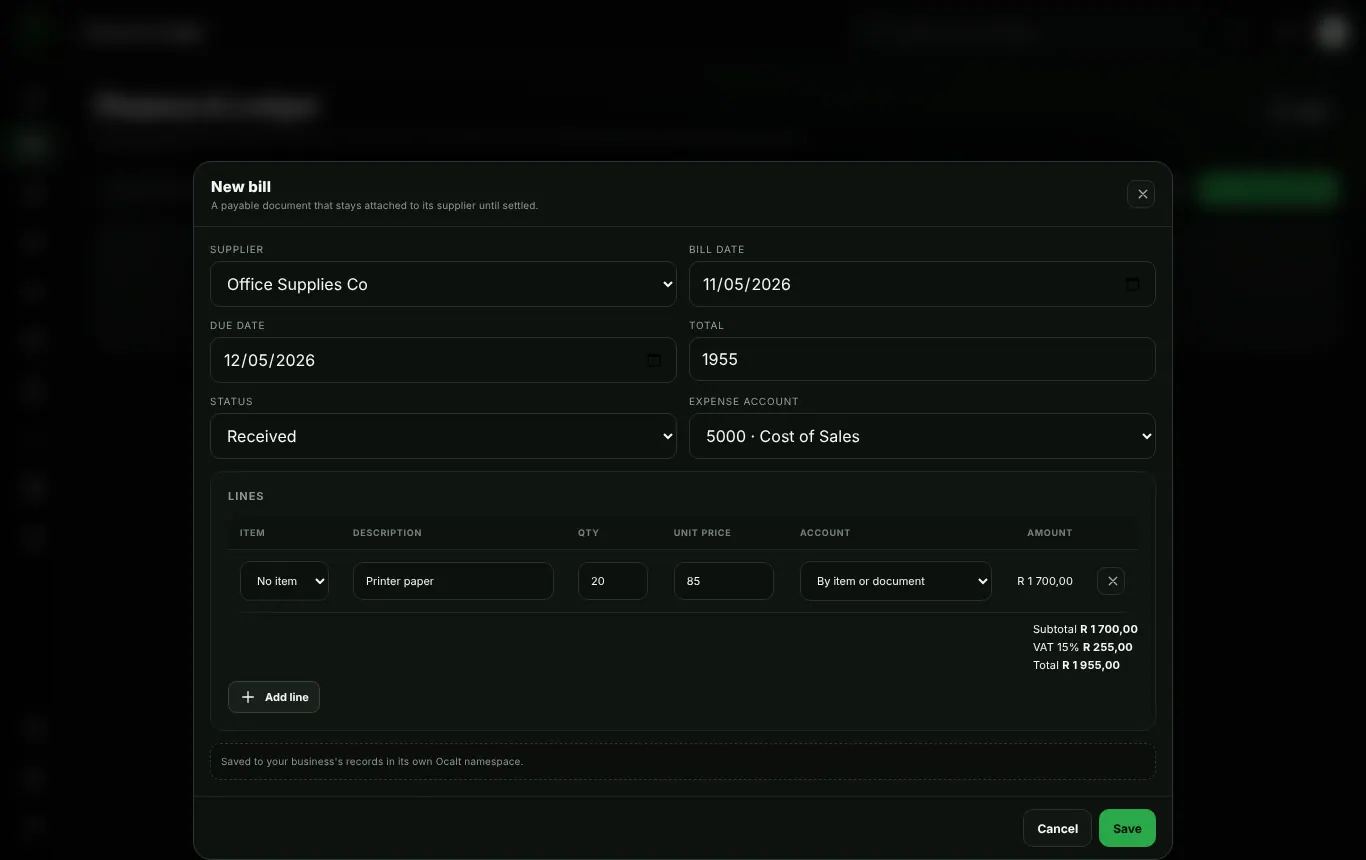
- Otherwise open Finance & Ledger, Payables, Create document: choose the supplier, the bill date and due date, add the lines and choose the expense account.
- Save. The bill is Received and goes to Approvals.
D.2Getting it approved
The approver (often the owner or finance manager) approves it in People, Approvals with Approve & post. An approved bill is posted to the books and is due to be paid. A clerk can enter bills without being able to approve them; that is set by the member's roles.
D.3Paying a bill
- Open Reports, Aged balances to see what falls due this week.
- Pay the supplier from the bank.
- Open the bill and choose Record payment: the amount, the date and the bank account it was paid from. The bill shows as Paid once settled in full.
- Match the payment in Cash & Banking, Reconcile when the statement comes in.